search

Custom Search
Affichage des articles dont le libellé est Solaris. Afficher tous les articles

dimanche 11 novembre 2012

How to start / stop Solaris services


Checking service status

# svcs -a


You can "grep" the wanted status => 

# svcs -a | grep disabled


To start the service =>

svcadm enable /network/shell:kshell

Stop it ==>

svcadm disable /network/shell:kshell

Restart ==>

svcadm restart /network/shell:kshell


How to kill zombie process on Solaris


Ex :

$ ps -edf | grep defunct


root     7542  7541   0        - ?           0:00 <defunct>
root     7450  7449   0        - ?           0:00 <defunct>
root     7546  7545   0        - ?           0:00 <defunct>
root     7544  7543   0        - ?           0:00 <defunct>


$ ps -ecl | grep Z

F S    UID   PID  PPID  CLS PRI     ADDR     SZ    WCHAN TTY         TIME CMD
0 Z  59002  7450  7449    -   0        -      0        - ?           0:00 <defunct>


$ preap 7450
7450: exited with status 0


$ preap 7542
7542: exited with status 0


$ preap 7544
7544: exited with status 0


$ preap 7546
7546: exited with status 0


$ ps -edf | grep defunct
$


BING !


No more zombie here ^^

jeudi 1 novembre 2012

CONTROL-M system variables


CONTROL-M system variables

%%CYCLIC Y|N This variable is used in the command line of the
ctmorder utility to override the Cyclic
parameter in cases where the user wishes to
order a single run of a job that is defined as
cyclic.
Y – job is cyclic
N – job should be run only once.


%%DATACENTER string Name of the data center for the current
CONTROL-M installation.
Note: This variable is available on certain
CONTROL-M computers as of
CONTROL-M version 2.20. However, prior to
CONTROL-M/EM version 6.1.02,
%%DATACENTER returned the host name for
the current CONTROL-M/Server.


%%DATE yymmdd Current system date.


%%DAY dd Current system day.


%%GROUP_ORDID nnnnnn Order ID of the group to which the job belongs.
Note: This variable is valid only for jobs in a
group scheduling table and it is evaluated in
base 10.


%%JOBNAME string Name of the submitted job. This variable can be
used to override the value specified for the
JOBNAME parameter (for example, in the
ctmorder utility).
Note: On a Microsoft Windows computer,
JOBNAME must comply with Microsoft naming
conventions (for example, it cannot contain /
and \ characters).


%%JULDAY nnn Current system day of the year (Julian format).


%%MEMLIB string Mem Lib (name of the library or directory in
which job script is stored) of the job.


%%MONTH mm Current system month.


%%NEXT yymmdd Next scheduling date for the job.


%%ODATE yymmdd Original scheduling date of the job.


%%ODAY dd Original scheduling day of the job.
%%OJULDAY nnn Original scheduling day of the year (Julian
format).
For example, 36 for February 5th.


%%OMONTH mm Original scheduling month of the job.
Name Format Description


%%ORDERID nnnnnn Unique job order ID under CONTROL-M.


%%OWDAY d Original scheduling day of the week of the job
(1= Sun., 2= Mon., and 0=Sat.).


%%OWNER string Owner (user ID) associated with the job.


%%OYEAR yy Original scheduling year of the job.


%%POSTCMD command Specifies a command to run immediately after
running the job defined by MEMNAME. The
return code is ignored.
Note: Not relevant for z/OS jobs. Relevant only
for CONTROL-M/Server version 6.0.01 or later,
or (without SYSOUT) for any job submitted by
CONTROL-M/Agent for Microsoft Windows
2000 version 6.0.01 or later. This variable is not
used with group scheduling tables.


%%PRECMD command Specifies a command to run immediately before
running the job defined by MEMNAME. The
return code is ignored.
Note: Not relevant for z/OS jobs. Relevant only
for CONTROL-M/Server version 6.0.01 or later,
or (without SYSOUT) for any job submitted by
CONTROL-M/Agent for Microsoft Windows
2000 version 6.0.01 or later. This variable is not
used with group scheduling tables.


%%PREV yymmdd Previous scheduling date for the job.


%%RDATE yymmdd Installation current working date.


%%RDAY dd Installation current working day.


%%RJULDAY nnn Installation current working day of the year
(Julian format).

For example, 36 for February 5th.

%%RMONTH mm Installation current working month.


%%RUNCOUNT nnnn Number of times the job order has been
submitted for execution (that is, the first time
the job is being submitted, this variable returns
a value of 1).


%%RWDAY n Installation current working day of the week
(1=Sun., 2=Mon., and 0=Sat.).


%%RYEAR yy Installation current working year.


%%SCHEDTAB string Name of the job’s Scheduling table.
Note: This variable is available on certain
CONTROL-M computers as of
CONTROL-M version 2.2x.


%%TIME hhmmss Time of day.
Table 49 CONTROL-M system variables (part 3 of 4)
Name Format Description

The following variables are not assigned values until after the job is submitted or
completes execution. These variables can be used only for the Shout, Do Shout, Do
Mail, and Do AutoEdit parameters.


%%WDAY n Current system day of the week (1=Sun.,
2=Mon., and 0=Sat.).


%%YEAR yy Current system year.
NOTE
AutoEdit variables that return runtime statistics for a job must be resolved before the
variables can return any values. AutoEdit variables for job statistics: %%AVG_CPU,
%%AVG_TIME, %%SD_CPU, and %%SD_TIME.
Run the ctmjsa utility to compile data in the Statistical Details table before specifying the
required AutoEdit statistics variable. For more information, see “Runtime Statistics” and
Name Format Description


%%AVG_CPU numeric Average CPU time (in seconds) for previous runs of the
current job. Note: Do not use this variable in a group
scheduling table definition.


%%AVG_TIME numeric Average run time (in seconds) for previous runs of the
current job or group scheduling table.


%%COMPSTAT numeric Completion code assigned to the job by the
operating system of the computer that executes the job.
Initial value: 0.


%%JOBID string Identification assigned to the job by the operating system
of the computer that executes the job. Note: Do not use
this variable in a group scheduling table definition.


%%NODEID string Node ID of agent computer that submitted the job. Note:
This variable is available for certain computers as of
CONTROL-M version 2.2x.


%%SD_CPU numeric Standard deviation of the CPU time (in seconds) from the
average CPU time for previous runs of the current job.
Note: Do not use this variable in a group scheduling table
definition.


%%SD_TIME numeric Standard deviation of the elapsed run time (in seconds)
from the average elapsed run time for previous runs of
the current job or group scheduling table.


ALOM / ILOM Shell Configuration Commands


ALOM ILOM Shell Configuration Commands


ALOM CMT CommandSummaryComparable ILOM Command
passwordChanges the login password of the current user.set /SP/users/username password
restartsshRestarts the SSH server so that new host keys generated by the ssh-keygen command are reloaded.set /SP/services/ssh restart_sshd_action=true
setdate [[mmdd]HHMM |mmddHHMM[cc]yy][.SS]Sets ALOM CMT date and time.set /SP/clock datetime=value
setdefaults setdefaults –aResets all ALOM CMT configuration parameters to their default values. The –a option resets the user information to the factory default (one admin account only).set /SP reset_to_defaults=configuration
set /SP reset_to_defaults=all
setkeyswitch [normal|stby|diag| locked]Sets the status of the virtual keyswitch. Setting the virtual keyswitch to standby (stby) powers off the server. Before powering off the host server, ALOM CMT asks for a confirmation.set /SYS keyswitch_state=value
setsc [param] [value]Sets the specified ALOM CMT parameter to the assigned value.set target property=value
setupscRuns the interactive configuration script. This script configures the ALOM CMT configuration variables.No equivalent in ILOM
showplatform [–v]Displays information about the host system’s hardware configuration, and whether the hardware is providing service. The –v option displays verbose information about the displayed components.show /HOST
showfruDisplays information about the field-replaceable units (FRUs) in a host server.No equivalent in ILOM
showusers
showusers –g lines
Displays a list of users currently logged in to ALOM CMT. The display for this command has a similar format to that of the UNIX command who. The –g option pauses the display after the number of lines you specify for lines.show /SP/sessions
No equivalent in ILOM
showhost
showhost version
Displays version information for host-side components. The version option displays the same information as the showhost command with no option.show /HOST
showkeyswitchDisplays status of virtual keyswitch.show /SYS keyswitch_state
showsc [param]Displays the current non-volatile random access memory (NVRAM) configuration parameters.show target property
showdateDisplays the ALOM CMT date. ALOM CMT time is expressed in Coordinated Universal Time (UTC) rather than local time. The Solaris OS and ALOM CMT time are not synchronized.show /SP/clock datetime
ssh-keygen –l
ssh-keygen –r
ssh-keygen –t {rsa|dsa}
Generates Secure Shell (SSH) host keys and displays the host key fingerprint on the SC.show /SP/services/ssh/keys rsa|dsa
set /SP/services/ssh generate_new_key_action=true
set /SP/services/ssh generate_new_key_type=[rsa|dsa]
usershow [username]Displays a list of all user accounts, permission levels, and whether passwords are assigned.show /SP/users
useradd usernameAdds a user account to ALOM CMT.create /SP/users/username
userdel username
userdel –y username
Deletes a user account from ALOM CMT. The –y option enables you to skip the confirmation question.delete /SP/users/username
delete –script /SP/users/username
userpassword [username]Sets or changes a user password.set /SP/users/username password
userperm [username] [c] [u] [a] [r]Sets the permission level for a user account.set /SP/users/username role=permissions
(where permissions are Administrator or Operator)


ALOM CMT Shell Log Commands


ALOM CMT CommandSummaryComparable ILOM Command
showlogs [–b lines|–e lines|–v] [–g lines] [-p logtype[r|p]]Displays the history of all events logged in the ALOM CMT RAM event log, or major and critical events in the persistent log. The –p option selects whether to display entries only from the RAM event log (logtype r) or the persistent event log (logtype p).show /SP/logs/event/list
No equivalent in ILOM
consolehistory [–b lines|–e lines|–v] [–g lines] [boot|run]Displays the host server console output buffers.No equivalent in ILOM


ALOM CMT Shell Status and Control Commands


ALOM CMT CommandSummaryComparable ILOM Command
showenvironmentDisplays the environmental status of the host server. This information includes system temperatures, power supply status, front panel LED status, hard disk drive status, fan status, voltage, and current sensor status.show –o table –level all /SYS
showpower [–v]Displays power metrics for the host server.show /SP/powermgmt
shownetwork [–v]Displays the current network configuration information. The –v option shows additional information about your network, including information about your DHCP server.show /SP/network
console
console –f
Connects to the host system console. The –f option forces the console write lock from one user to another.start /SP/console
No equivalent in ILOM
break –c
break –D
Drops the host server from running the Solaris OS software into OpenBoot PROM or kmdb depending upon the mode in which the Solaris software was booted.set /HOST send_break_action=break
set /HOST send_break_action=dumpcore
bootmode [normal] [reset_nvram] [config=configname][bootscript =string]Controls the host server OpenBoot PROM firmware method of booting.set /HOST/bootmode property=value
[where property is state, config, or script]
flashupdate –s IPaddr –f pathname [–v]Downloads and updates system firmware (both host firmware and ALOM CMT firmware). For ILOM, ipaddr must be a TFTP server. If DHCP is used, ipaddr can be replaced by the name of the TFTP host.load –source tftp://ipaddr/pathname
reset [–c]
reset [–y][–c]
reset –f
reset –d
reset [–d][–f]
reset [–d][–n]
reset [–d][–f][–n]
Attempts to gracefully reset the system. If that fails, this option forcefully reset the system.
Forcfully resets the system.
Attempts to gracefully reset the control domain. If that fails, this option forcefully reset the control domain.
Forcefully resets the control domain.
When resetting the control domain, this option may automatically boot (this is the default behavior when the auto-boot option is not specified).
When resetting the control domain, this option does not automatically boot and stays at the OpenBoot ok prompt. This option overrides all reboot variables and stops the control domain at the OpenBoot ok prompt after host reset. The auto-boot? option remains unchanged, thus subsequest reset commands automatically reboot host if the auto-boot? option is set to true.
reset /SYS
reset -script /SYS
reset -f /SYS
reset /HOST/domain/control
reset - f /HOST/domain/control
set /HOST/domain/control auto-boot=disable reset /HOST/domain/control
set /HOST/domain/control auto-boot=disable reset -f /HOST/domain/control
powercycle [–y] [–f]
powercycle –y
powercycle -f
poweroff followed by poweron. The –f option forces an immediate poweroff, otherwise the command attempts a graceful shutdown.stop /SYS
start /SYS
stop –script /SYS
start –script /SYS
stop –force /SYS
start –force /SYS
poweroff
poweroff –y
poweroff –f
Removes the main power from the host server. The –y option enables you to skip the confirmation question. ALOM CMT attempts to shut the server down gracefully. The –f option forces an immediate shutdown.stop /SYS
stop –script /SYS
stop –force /SYS
poweronApplies the main power to the host server or FRU.start /SYS
setlocator [on/off]Turns the Locator LED on the server on or off.set /SYS/LOCATE value=value
showfaults [–v]Displays current valid system faults.show /SP/faultmgmt
clearfault UUIDManually repairs system faults.set /SYS/component clear_fault_action=true
showlocatorDisplays the current state of the Locator LED as either on or off.show /SYS/LOCATE


ALOM CMT Shell FRU Commands


ALOM CMT CommandSummaryComparable ILOM Command
setfru –c dataThe –c option enables you to store information (such as inventory codes) on all FRUs in a system.set /SYS customer_frudata=data
[showfru –g lines] [–s|–d] [FRU]Displays information about the FRUs in a host server.No equivalent in ILOM
removefru [–y] [FRU]Prepares a FRU (for example, a power supply) for removal. The –y option enables you to skip the confirmation question.set /SYS/PS0 prepare_to_remove_action=true


ALOM CMT Shell Automatic System Recovery (ASR) Commands


ALOM CMT CommandSummaryComparable ILOM Command
enablecomponent asr-keyRemoves a component from the asr-db blacklist.set /SYS/component component_state=enabled
disablecomponent asr-keyAdds a component to the asr-db blacklist.set /SYS/component component_state=disabled
showcomponent asr-keyDisplays system components and their test status (ASR state).show /SYS/component component_state
clearasrdbRemoves all entries from the asr-db blacklist.No equivalent in ILOM


ALOM CMT Shell Miscellaneous Commands

ALOM CMT CommandSummaryComparable ILOM Command
help [command]Displays a list of all ALOM CMT commands with their syntax and a brief description of how each command works. Specifying a command name as an option enables you to view the help for that command.help
resetsc
resetsc –y
Reboots ALOM CMT. The –y option enables you to skip the confirmation question.reset /SP
reset –script /SP
userclimodeSets the type of shell to shelltype, where shelltype is default or alom.set /SP/users/username cli_mode=shelltype
logoutLogs out from an ALOM CMT shell session.exit

Solaris mirror and grow metadevice


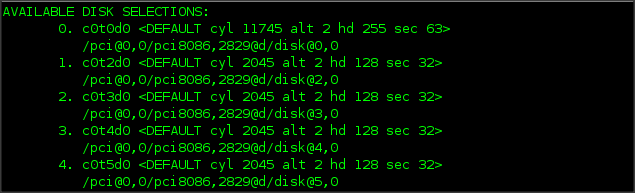
Use Format command to list disks :


Now we create the metadevice:


# metainit d201 1 1 c0t3d0s2


# metainit d202 1 1 c0t4d0s2


Make the mirror d200 :

# metainit  d200 -m d201 d202


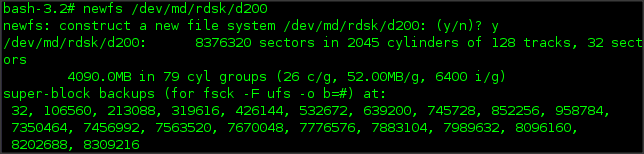
We format the new filesystem :

# newfs /dev/md/rdsk/d200


We mount the filesystem :


Ok we have here 4g


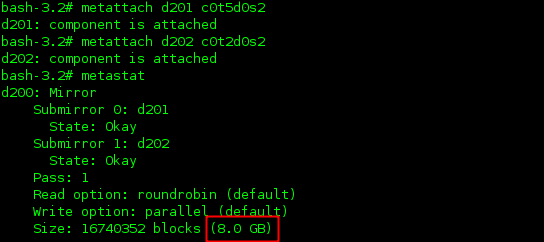
We attach 2 new slices :

# metattach d201 c0t5d0s2


# metattach d202 c0t2d0s0

Metastat command show the new mirror size:


But the #df -h command show only 4g...


For that, we need to "growfs"

# growfs -M /test /dev/md/rdsk/d200


We can now check the size ==>


==> OK